cu
Built a tiny Tauri tray app for short-term snippet storage. Double-tap Shift and the current selection is saved to an always-on-top panel, captured through Rust global key hooks and a synthetic copy, with unsigned Windows and macOS builds published from CI.
Description
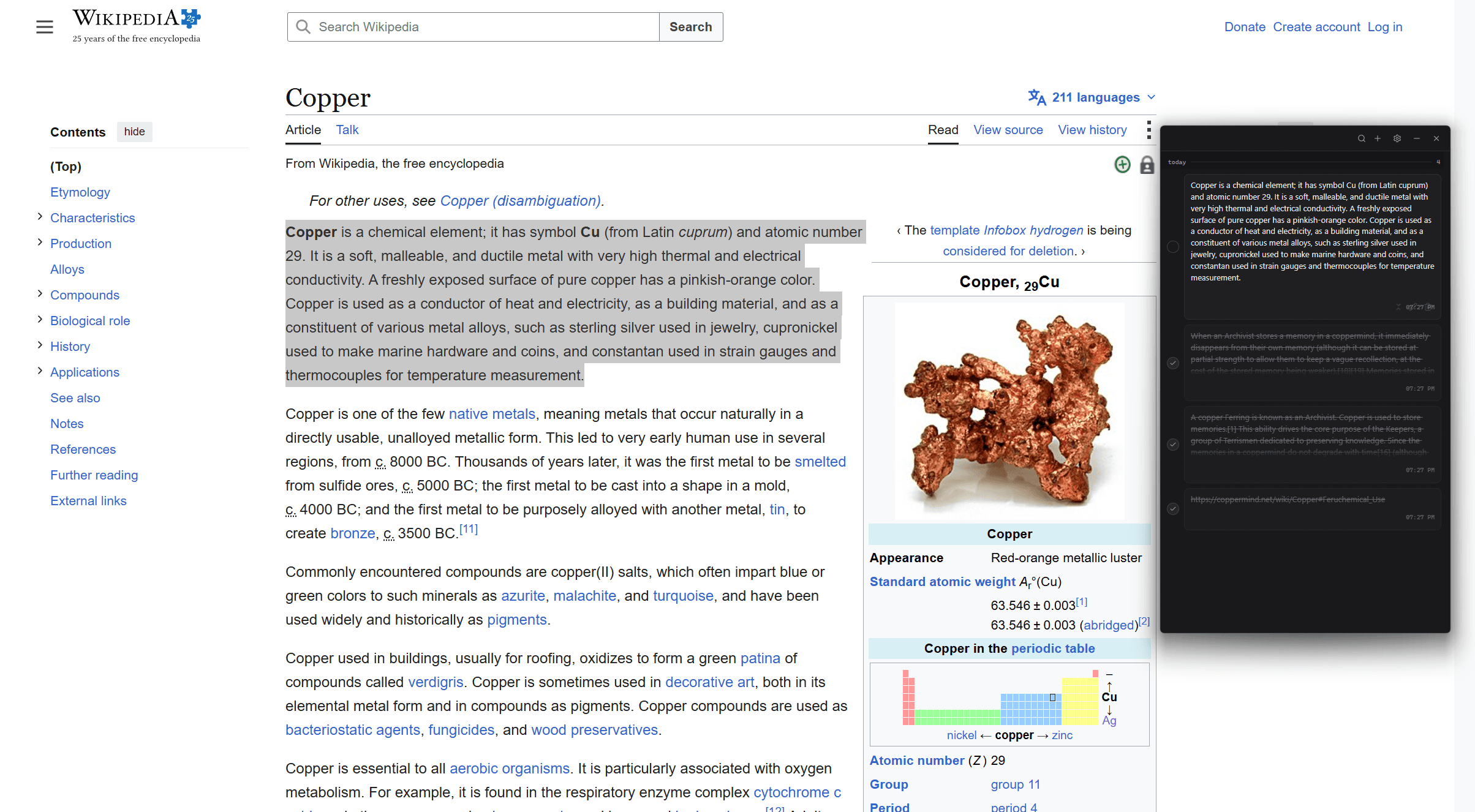
cu is a small open-source tray app for snippets you only need for a little while. Select text in any application, double-tap Shift, and it's saved as a card in a thin always-on-top panel. Click the card later and it's back on your clipboard. That's the whole loop. There are no folders, tags, or sync because nothing in it is supposed to matter next week: it holds links, error messages, addresses, the paragraph you need for the next hour. Storage is a plain JSON file capped at the 500 most recent notes.
When the trigger fires, cu simulates Ctrl+C (Cmd+C on macOS), reads whatever landed on the clipboard, and saves it. If nothing was selected your previous clipboard is restored untouched. The tray icon pulses to confirm the capture, so you never have to look away from whatever you were reading. The trigger itself is configurable, either a double-tap of a key or a modifier chord, recorded straight from the settings screen.
A global hotkey summons the panel at your pointer like a context menu. Cards can be copied back, expanded to edit, checked off as done, or deleted with a short undo window. There's search, manual entry, a pause toggle in the tray menu, light and dark themes, and launch at login. Closing the window just hides it; the app lives in the tray until you quit it from there.
When the trigger fires, cu simulates Ctrl+C (Cmd+C on macOS), reads whatever landed on the clipboard, and saves it. If nothing was selected your previous clipboard is restored untouched. The tray icon pulses to confirm the capture, so you never have to look away from whatever you were reading. The trigger itself is configurable, either a double-tap of a key or a modifier chord, recorded straight from the settings screen.
A global hotkey summons the panel at your pointer like a context menu. Cards can be copied back, expanded to edit, checked off as done, or deleted with a short undo window. There's search, manual entry, a pause toggle in the tray menu, light and dark themes, and launch at login. Closing the window just hides it; the app lives in the tray until you quit it from there.
Technologies
The shell is Tauri v2 with a Rust backend and a React + TypeScript panel built with Vite, Tailwind, and shadcn/ui, with bun as the package manager. Notes and settings are JSON files in the platform app-data directory. I didn't want a database for a tool this small.
The interesting parts are in the Rust layer. rdev installs global low-level keyboard hooks and feeds a small state machine that recognizes double-taps and chords, enigo synthesizes the copy keystroke, and arboard reads and restores the clipboard. rdev ships from two different sources depending on the platform: the crates.io release on Windows, where the newer git revision stalls and gets its hooks evicted, and a git pin on macOS, where the crates.io release crashes on macOS 15 for calling input-source APIs off the main thread. Same crate, two builds, because each platform breaks the other's version.
Releases run through GitHub Actions. Pushing a version tag builds the Windows installer and both macOS architectures and publishes them as an unsigned GitHub release.
The interesting parts are in the Rust layer. rdev installs global low-level keyboard hooks and feeds a small state machine that recognizes double-taps and chords, enigo synthesizes the copy keystroke, and arboard reads and restores the clipboard. rdev ships from two different sources depending on the platform: the crates.io release on Windows, where the newer git revision stalls and gets its hooks evicted, and a git pin on macOS, where the crates.io release crashes on macOS 15 for calling input-source APIs off the main thread. Same crate, two builds, because each platform breaks the other's version.
Releases run through GitHub Actions. Pushing a version tag builds the Windows installer and both macOS architectures and publishes them as an unsigned GitHub release.
Things Learned
Low-level input hooks on Windows come with rules I learned the hard way. If a hook's thread misses its dispatch deadline, Windows silently removes the hook, and that happens reliably while WebView2 is eating the CPU during startup. cu handles it with a watchdog that compares the system's last-input time against the last event the hook actually delivered, and reinstalls the hooks when the two disagree.
That watchdog caused the best bug of the project. It only counted keyboard events as proof the hook was alive, but compared against a system counter that includes mouse input, so any stretch of scrolling without typing looked like a dead hook. It would install a fresh pair of keyboard and mouse hooks every thirty-odd seconds without removing the old ones, and since every hook adds a synchronous hop to every keystroke and mouse move on the machine, after an hour of browsing the whole computer was visibly lagging. Tracing "my PC feels slow" back to my own tray app was humbling, and fixing it forced me to actually understand how Windows delivers input instead of treating the hooks as a black box.
macOS needed its own round of negotiation: an Accessory activation policy so cu acts like a menu-bar app instead of a Dock app, a raw Objective-C call for window collection behavior Tauri doesn't expose so the panel can show over fullscreen Spaces, and moving keystroke synthesis onto the main thread because macOS 15 kills the process otherwise. Between that and writing install instructions that walk people past SmartScreen and Gatekeeper for unsigned builds, a good chunk of this project was just getting two operating systems to tolerate it.
That watchdog caused the best bug of the project. It only counted keyboard events as proof the hook was alive, but compared against a system counter that includes mouse input, so any stretch of scrolling without typing looked like a dead hook. It would install a fresh pair of keyboard and mouse hooks every thirty-odd seconds without removing the old ones, and since every hook adds a synchronous hop to every keystroke and mouse move on the machine, after an hour of browsing the whole computer was visibly lagging. Tracing "my PC feels slow" back to my own tray app was humbling, and fixing it forced me to actually understand how Windows delivers input instead of treating the hooks as a black box.
macOS needed its own round of negotiation: an Accessory activation policy so cu acts like a menu-bar app instead of a Dock app, a raw Objective-C call for window collection behavior Tauri doesn't expose so the panel can show over fullscreen Spaces, and moving keystroke synthesis onto the main thread because macOS 15 kills the process otherwise. Between that and writing install instructions that walk people past SmartScreen and Gatekeeper for unsigned builds, a good chunk of this project was just getting two operating systems to tolerate it.